
Article· Updated June 2026
Two Claude Code subscriptions, one menu bar
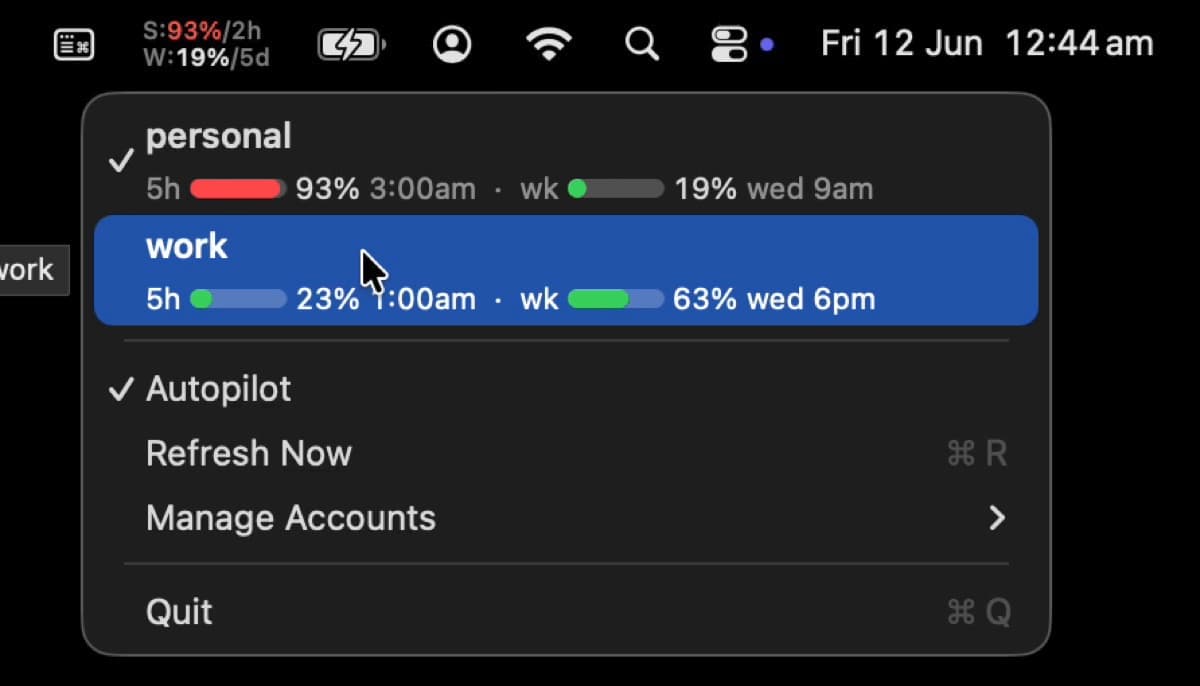
I run Claude Code on two subscriptions. Not for redundancy — for headroom. Agents are hungry: a few background sessions working across drafty.im and journeys.im will walk a 5-hour window to 90% before you notice, and once you're rationing turns you've lost the thing that makes agents worth running.
Two accounts solve the supply problem and create an information problem. Which account is the Mac on right now? How much is left in each window? When does the weekly limit reset, and on which account? The data exists — Claude Code's statusline shows your session's numbers — but it's per-session, buried in a terminal pane, and it can't see the other account at all. Switching was worse: the login lives in a macOS keychain item, so moving the Mac between accounts meant a shell script I'd written to snapshot and swap credentials, run from whatever terminal was handy.
So I shipped the obvious thing: a menu bar app.

The menu bar item is the statusline format, stacked — S:47%/3h over W:10%/5d, used percentage and time to reset for the 5-hour and weekly windows. Same numbers, same countdown rounding, just always on screen. The percentage goes amber at 70% and red at 90%, which turns out to be all the glanceability you need: you stop reading the numbers and start reacting to the color.
Click it and you get a native menu with both accounts — usage gauges, exact percentages, reset times — and clicking the inactive account switches the whole Mac. New sessions and agents pick up the new account immediately; running ones keep theirs, which is exactly what you want mid-task.
The judgment calls
The app owns no credential logic. Switching shells out to the same small CLI I was already using, which re-snapshots the live credential before every swap so refreshed tokens are never lost. The app is a viewer and a button; the thing that touches the keychain stays one auditable shell script. When a switch works from the terminal it works from the menu, and vice versa.
Native AppKit, one file of consequence. It's a NSStatusItem and a real NSMenu — system font, light and dark for free, ⌘Q works. No Electron, no web view, no dependency list. The build is swiftc against Sources/, which makes the distribution story honest too: you clone it and build it on your own machine in seconds, so there's no unsigned-binary Gatekeeper dance and nothing to trust but the Swift you can read.
Autopilot is policy, not magic. Off by default. When it's on: if the active account's 5-hour window hits 90% — or weekly hits 99% — and the other account has meaningfully more usable headroom, switch and say why in a notification. It's reset-aware in both directions: a 5-hour window that resets in twenty minutes gets ridden out instead of flipped away from, and when both accounts are weekly-constrained it prefers burning the one that refreshes sooner. One auto-switch per hour, maximum.
The first real auto-switch happened while I was recording the demo above — the active account crossed the threshold mid-recording and the Mac quietly moved itself to the other one, notification and all. Hard to ask for a better acceptance test.
What it replaced
The statusline used to carry my usage numbers and the failover logic rode along with it — a script that could only react when a session happened to render, and had to guess which account a session belonged to from its reset anchor. The app polls both accounts' real usage on a timer, so the statusline went back to what a statusline is for: model, directory, branch, context. (The freed-up space now shows a rotating quote, which is not load-bearing but does say ship it sometimes.)
The app is open source — the repo includes the credential-switching CLI and an installer: github.com/johnkueh/claude-usage-bar.
Frequently asked
Do you actually need two subscriptions, or is one enough?
One is plenty until you're running agents in parallel. A single human at a single terminal almost never walks a window to the limit — you read, you think, you type, and the plan's allowance is built for that rhythm. The math changes the moment background sessions are doing work while you do other work. Each agent team spawns its own Claude instances, every teammate carries its own context window, and the docs put plan-mode teams at roughly 7x the tokens of a normal session — so a couple of those running across two projects draws the window down fast. The second subscription isn't about Opus being expensive; it's about not rationing turns when you've got four worktrees all wanting to verify their own work. If you're still one session at a time, skip it and put the money somewhere it earns more.
Can't you already see your usage with /usage?
You can, and it's good — /usage shows plan usage bars, and on Pro, Max, Team, or Enterprise it breaks down what's eating the window by skills, subagents, plugins, and individual MCP servers, with d and w to flip between the last 24 hours and the last 7 days. Two gaps are why I still built the menu bar. First, it's a command you have to run, in a session, when you remember to — not a glanceable thing that goes amber before you blow the window. Second, the docs are explicit that the figures are “computed from local session history on this machine, so usage from other devices or claude.ai is not included” — and crucially, a /usage call in one account can't see the other account at all. The whole point of two subscriptions is the second account, so the one number I most needed was the one /usage structurally can't show me.