
Claude Code skill
veo-video-gen
Animate a still into a cinematic clip with Veo 3.1 — exact cost quoted before every run.
Add the marketplace once, then install this skill:
claude plugin marketplace add johnkueh/claude-skillsclaude plugin install veo-video-gen@johnkueh-skillsOr grab the whole collection: claude plugin install claude-skills@johnkueh-skills
See it
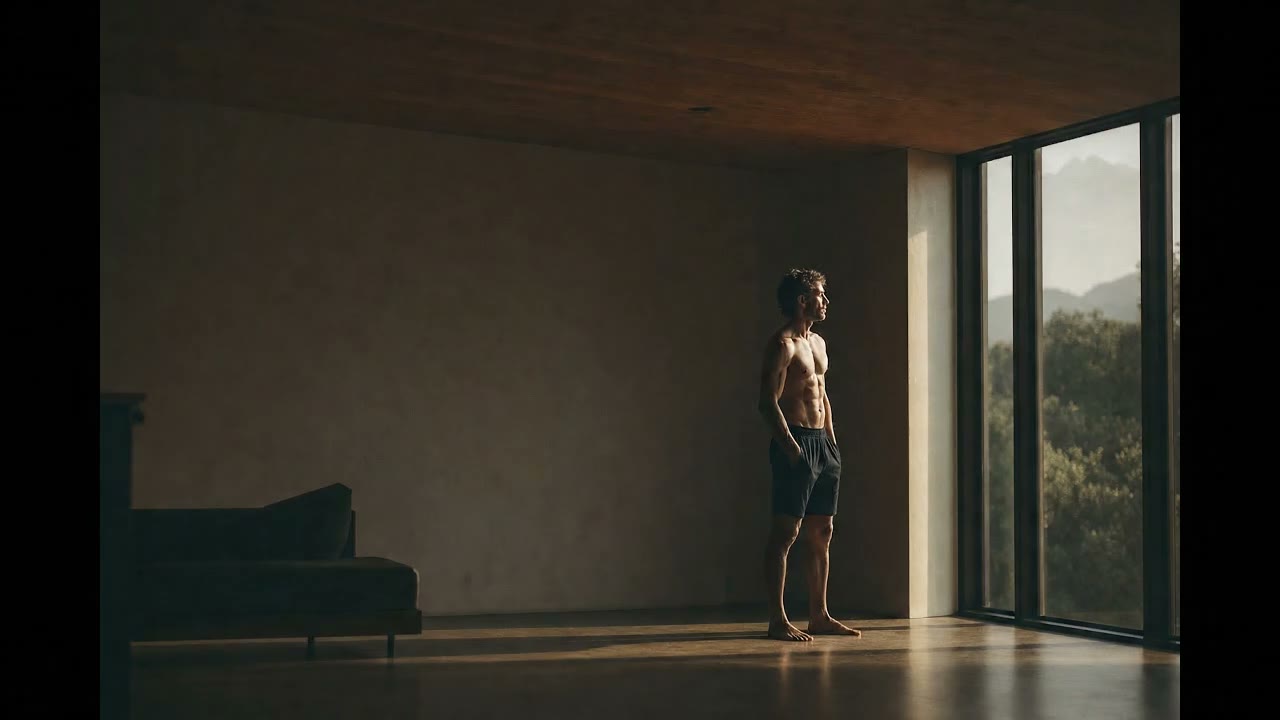
The glp3.wiki hero: a GPT Image 2 still animated by Veo 3.1, played once and frozen on the last frame. 80¢.
Why it exists
Veo 3.1 turns a still into a cinematic clip, so it pairs with the GPT Image 2 skill: generate the hero frame there, animate it here. It bills a flat per-second rate by tier and resolution, so unlike a per-image API there's no guessing — the skill quotes the exact dollar cost before every run and logs it. It defaults to the play-once hero pattern (plays through, freezes on the last frame) over fighting loop seams, and bakes in the lessons that actually cost me time: the safety filter rejects shirtless/physique subjects (a clothed one passes) and Lite is stricter than Fast, so it warns on risky wording, keeps 'allow adult' on, and treats Fast as the floor for any figure. I built it shipping the glp3.wiki hero — a still, animated for eighty cents. A safety-filtered or timed-out run is $0.
In practice
---
name: veo-video-gen
description: Generate cinematic videos with Google's Veo 3.1 (Gemini API) — text→video and image→video, pairing with the gpt-image-gen-2 still as the first frame. Quotes the exact $ cost before every call (flat per-second), supports true-loop (first=last frame) and web-ready MP4/WebM/poster output, and bakes in the play-once hero pattern and RAI-wording guidance. Triggers on "generate a video", "veo", "animate this image", "image to video", "cinematic hero video", "make a background video", "loop this image", "video from a still", or any motion/clip request.
---

# veo-video-gen

Turn a still (or a text brief) into a cinematic Veo 3.1 clip, quote the cost up
front, and optionally produce web-ready files. The natural pairing for
`gpt-image-gen-2`: generate a hero **still** there, animate it here. See
`PROMPTING.md` for the full prompt guide and the hard-won RAI rules.

**Setup:** TypeScript CLI (`cli.ts`) — run `pnpm install` in this directory once
(Node ≥ 18). Auth: `GEMINI_API_KEY` in `~/.config/veo-gen/env` as
`export GEMINI_API_KEY=…`, or exported in your shell. `ffmpeg` is optional
(only for `--web`). Usage log at `~/.config/veo-gen/usage.jsonl`.

## Your job

1. **Classify** the request: `text→video` (no source image) or `image→video`
   (animate a still — the default for heroes; use the gpt-image-gen-2 PNG).
2. **Decide loop vs play-once.** Default to **play-once** (let the clip play and
   freeze on the last frame in the page — drop the HTML `loop` attr). Only use a
   real loop (`--loop`) for genuinely ambient/cyclical motion.
3. **Assemble the prompt** per `PROMPTING.md` (Subject · Action · Camera ·
   Composition · Focus · Ambiance · Style). For a background hero: ONE subtle
   beat, and explicitly negate the "AI glow" (no god-rays/beams/glow/dust).
4. **Check the wording for RAI risk** (body/physique words + a person = likely
   rejection). The CLI warns; reword to neutral before spending.
5. **Quote the cost** (`--dry-run`) and show the user, then generate.
6. **Deliver:** with `--web`, hand back the MP4 + WebM + poster and the
   `<video>` wiring; otherwise the raw MP4.

If the user already gave a complete brief, skip the interview.

## Cost — quoted before every call

Pricing is **flat per-second × resolution** (audio included), so the cost is
**exact**, not a guess. The CLI prints it before every call and on `--dry-run`.

| Tier | 720p | 1080p | 4k |
|---|---|---|---|
| **Fast** (default) | **$0.10/s** | $0.12/s | $0.30/s |
| Standard | $0.40/s | $0.40/s | $0.60/s |
| Lite | $0.05/s | $0.08/s | — |

`cost = durationSeconds × rate`. An 8s/720p Fast clip = **$0.80**. A
**safety-filtered or timed-out** generation is **$0** — the quote is a ceiling.
The Gemini API returns no `$` in its response, so the CLI computes and logs the
cost itself (`cost_estimated: true`).

## Commands

Run from this skill's base directory.

### Image → video (the hero pairing) + web output

```bash
pnpm exec tsx cli.ts generate \
  -i ./hero.png -p "<motion prompt>" \
  --model fast --duration 8 --resolution 720p --web --out ./hero.mp4
```

`--web` writes `hero.web.mp4` (H.264, faststart), `hero.web.webm` (VP9), and
`hero.poster.jpg`. Drop those into a `<video autoplay muted playsinline>` (no
`loop` for play-once; add `poster="hero.poster.jpg"`).

### True forward loop (first frame == last frame)

```bash
pnpm exec tsx cli.ts generate -i ./hero.png --loop \
  -p "<ambient motion that returns to the start pose>" \
  --web --crossfade 0.5 --out ./loop.mp4
```

`--loop` sets the last frame equal to the first so motion departs and returns;
`--crossfade 0.5` (with `--web`) adds a seamless tail→head fade if the seam is
loose.

### Text → video

```bash
pnpm exec tsx cli.ts generate -p "<full scene + motion prompt>" --duration 6
```

### Dry run (quote only, no spend)

```bash
pnpm exec tsx cli.ts generate -i ./hero.png -p "..." --dry-run
```

### Cost log

```bash
pnpm exec tsx cli.ts cost            # total + delivered/rejected counts
pnpm exec tsx cli.ts cost --tail 10  # last 10 calls
```

## Options

- `-i, --image <path>` — first-frame image (image→video).
- `--last-frame <path>` — explicit last frame (first+last interpolation).
- `--loop` — true loop: last frame = first frame (needs `--image`).
- `-m, --model` — `fast` (default) · `standard` · `lite`.
- `-d, --duration` — `4` · `6` · `8` (default 8). No 10s on any tier.
- `-r, --resolution` — `720p` (default) · `1080p` · `4k` (no 4k on Lite).
- `-a, --aspect` — `16:9` (default) · `9:16`.
- `--negative <text>` — negative prompt.
- `--no-allow-adult` — disable `personGeneration: allow_adult` (ON by default).
- `--web` / `--crossfade <sec>` — ffmpeg web encode (+ optional crossfade loop).
- `-o, --out` · `--dry-run` · `--no-open`.

## The play-once hero pattern (recommended)

For a directional/gestural clip, **play once and hold the last frame** — like
superpower.com. No loop seam to engineer. Wire it as:

```html
<video class="hero" autoplay muted playsinline preload="metadata"
       poster="hero.poster.jpg">
  <source src="hero.web.webm" type="video/webm">
  <source src="hero.web.mp4"  type="video/mp4">
</video>
```

```css
.hero{position:absolute;inset:0;width:100%;height:100%;object-fit:cover;}
@media (prefers-reduced-motion: reduce){.hero{display:none;}}  /* poster shows */
@media (max-width: 768px){.hero{display:none;}}                /* mobile: poster */
```

End the generated clip on a good resting frame; set `poster` to the first frame.

## Gotchas (learned shipping the glp3.wiki hero)

- **RAI filter is the main cost sink.** Shirtless/physique subjects get rejected;
  neutralize the wording, keep `allow_adult`, prefer **Fast over Lite** for any
  figure (Lite rejects what Fast accepts). Rejections are $0 but cost a slow
  round-trip — get wording right first.
- **Kill the AI glow.** Negate god-rays/light-beams/glow/floating-dust explicitly.
- **API quirks** (handled by the CLI, noted for debugging): image field is
  `bytesBase64Encoded` not `inlineData`; `durationSeconds` is a number;
  `generateAudio` is rejected by the preview models.
- **Veo can be slow** (40s–10min) and occasionally times out ($0). The CLI polls
  up to ~12min and prints the operation name so you can retry.

See `PROMPTING.md` for the prompt structure, worked examples, and the full
RAI-wording list.